
Published on: April 07, 2026
How much does WhatsApp cost: a business breakdown
How much does WhatsApp cost for a business? The answer depends entirely on which version you use. The basic WhatsApp Business app is completely free. But if you need automation, integrations, multi-user access, or the ability to message customers at scale, you will need the WhatsApp Business Platform — and that comes with usage-based charges that can add up quickly if you are not across how the pricing model works.
This guide breaks down WhatsApp Business pricing across every tier, explains the message categories that drive costs, and helps you understand what you are likely to pay based on how you plan to use it.
The three WhatsApp options for businesses
WhatsApp currently offers three different setups for businesses, each built for a different stage of growth. Understanding the difference is the starting point for working out how much does WhatsApp cost for your specific needs.
WhatsApp Business app — free
The WhatsApp Business app is a free download from the App Store or Google Play. It is designed for small businesses managing a low volume of customer conversations manually. You can set up a business profile, add opening hours, create a product catalogue, use quick reply templates, and send broadcast messages to a list of up to 256 contacts who have your number saved.
The limitations are significant though. Only one device can manage the account at any one time. There is no automation, no CRM integration, no analytics, and no way to assign conversations to different team members. For a solo trader or very small team, it works well. For anything more, it quickly falls short.
Meta Verified — paid subscription
Meta Verified (also called WhatsApp Business Premium) is a paid add-on to the Business app. It adds a verified badge, impersonation protection, multi-device access (up to ten devices depending on the plan), and priority support. Pricing in the UK starts from around £14.99 per month for the standard plan, with higher tiers adding more features and protected accounts.
Meta Verified does not solve the scalability problem — broadcasts still only reach contacts who have saved your number, and there is still no real automation or CRM syncing. It is a useful upgrade for businesses that want more credibility and team access, but it is not a replacement for the full API solution.
WhatsApp Business Platform (API) — usage-based pricing
The WhatsApp Business Platform — formerly known as the WhatsApp Business API — is the enterprise-grade option. It is designed for businesses that want to send automated messages at scale, integrate WhatsApp into their CRM or booking system, run chatbots, and manage large volumes of customer conversations across multiple team members.
This is where the real costs lie. The platform charges per message, and rates vary based on the message category and the recipient’s country. Understanding this model is essential if you are planning to use WhatsApp seriously for marketing, customer service, or operational messaging.
How WhatsApp Business API pricing works
Since July 2025, Meta moved away from a conversation-based billing model to a per-message (per-template) billing model. This is an important shift that affects how you budget for WhatsApp usage.
Under the old model, you paid per 24-hour conversation window — meaning all messages sent and received within 24 hours of the first message were covered by a single fee. Under the new model, every template message you send is charged individually, based on its category and the recipient’s country calling code.
Not all messages are charged though. Non-template messages — plain text, images, responses to customer queries — sent within an open customer service window (which begins when a customer messages you) are free. Utility template messages sent within that same window are also free. Only messages sent outside that window, or outbound marketing and authentication templates, incur charges.
The four message categories and what they cost
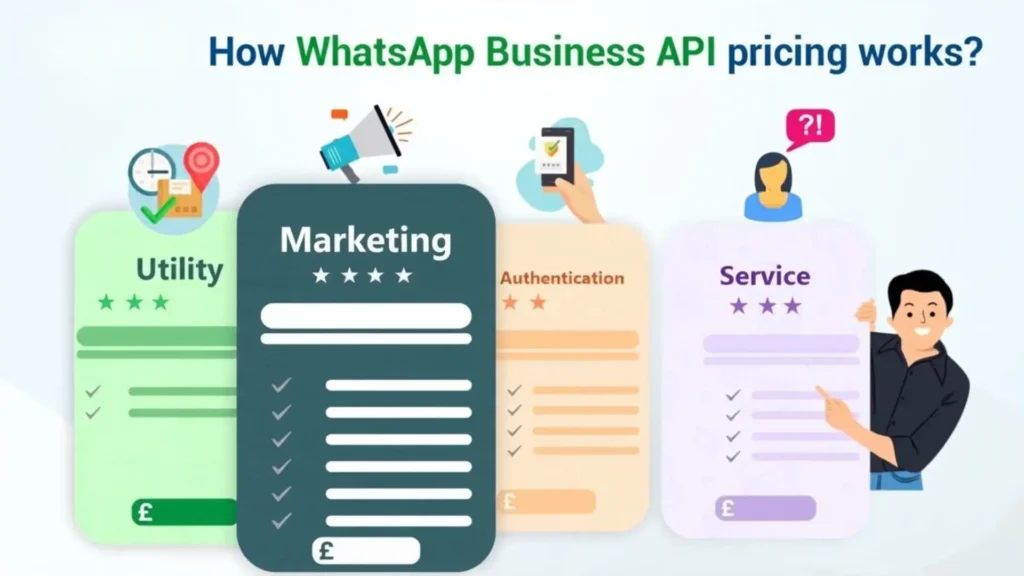
WhatsApp splits messages into four categories, each with different pricing:
- Marketing messages: Promotional content — offers, newsletters, abandoned cart reminders, announcements. These are the most expensive category. In the UK, the rate is approximately £0.038 per marketing message.
- Utility messages: Transactional updates triggered by a customer action — order confirmations, shipping updates, appointment reminders, payment receipts. In the UK, these cost approximately £0.022 per message.
- Authentication messages: Identity verification, one-time passwords, login codes. Similar in price to utility messages in most markets.
- Service messages: Responses to customer-initiated conversations, sent within the 24-hour customer service window. These are free of charge.
Pricing varies by country, so the rates your customers are charged depend on where they are located, not where your business is based. Meta publishes its full rate cards publicly — you can find the latest figures on the official WhatsApp Business pricing page to check exact rates for your target markets.
Free entry points: how to reduce WhatsApp messaging costs
One of the most valuable — and underused — features in WhatsApp Business pricing is the free entry point window. When a customer messages your business through a Click-to-WhatsApp ad on Facebook or Instagram, or via a WhatsApp button on your Facebook page, a 72-hour free window opens.
During this window, any message you send — including template messages — is free of charge. This means that if you run well-targeted paid social ads that drive inbound WhatsApp conversations, your follow-up messaging costs nothing for the first 72 hours. For businesses investing in paid social already, this is a genuinely significant cost saving.
Outside of paid ads, a standard 24-hour customer service window also opens whenever a customer messages you directly. Responses sent within this window do not trigger a charge. The financial implication is clear: the more you can get customers to initiate the conversation with you, the more of your WhatsApp activity falls into the free category.
Not sure how much WhatsApp will cost your business?
The free app works for small teams, but automation, integrations and scale require the WhatsApp Business API — where costs depend on message type and volume.
What else adds to the cost of WhatsApp Business API?
The per-message fees charged by Meta are only part of the picture. To use the WhatsApp Business API, you need to work through a Business Solution Provider (BSP) — a third-party platform that provides the interface, tools, and infrastructure to connect your WhatsApp account to your systems. BSPs have their own fee structures on top of what Meta charges.
Typical additional costs include:
- Platform/software fee: Monthly subscription fees to the BSP, which can range from around £50 to several hundred pounds per month depending on the features and messaging volume included in the plan.
- Setup fees: Some BSPs charge an onboarding or setup fee to configure your account, connect your systems, and create your message templates. These vary but can be up to £500–£1,000 for complex integrations.
- Per-message surcharges: Some BSPs charge their own small markup per message on top of Meta’s rate. These can range from negligible to a significant additional cost depending on the provider, so it is worth comparing BSP fee structures carefully.
- Phone number setup: You will need a dedicated phone number for the API — either a new SIM or a virtual number. This is a one-off cost but worth factoring in.
When you add up Meta’s per-message fees, a BSP platform subscription, and any additional markups, the total monthly cost of using the WhatsApp Business API for active marketing and customer service can range from a few hundred pounds for a small business sending modest volumes to several thousand pounds per month for a large-scale operation. The key variable is message volume, particularly in the marketing category.
How to estimate your WhatsApp costs
A useful way to think about how much does WhatsApp cost for your business is to estimate your monthly message volume by category.
Start by asking:
- How many outbound marketing messages will you send each month, and to how many contacts?
- How many transactional messages will be triggered — order updates, booking confirmations, reminders?
- How many inbound customer service conversations do you handle, and what is the average response rate?
- Will your customers be primarily in the UK, or across multiple countries with different rate cards?
As a rough illustration: a UK business sending 5,000 marketing messages per month to UK customers would pay approximately £190 in marketing message fees alone, before platform costs. If 2,000 of those campaigns prompt a customer reply, the follow-up service messages within those 24-hour windows are free. Utility messages for confirmations might add another £40–£50. Add a BSP subscription of around £150–£200 per month, and a typical small-to-medium marketing operation might spend £400–£500 per month in total.
For businesses with higher volumes or more complex needs, costs scale accordingly. This is why it pays to map out your expected usage pattern before committing to a platform or BSP.
Which option is right for your business?
The answer depends on your size, messaging volume, and what you want to achieve with WhatsApp.
The free WhatsApp Business app is ideal if you are a small business managing a handful of customer conversations per day. It costs nothing and is easy to set up. The limitation is that it does not scale — one device, manual operation, and no real analytics.
Meta Verified works well if you want to add team access and a verified badge without moving to the API. It is a reasonable middle step for businesses growing beyond the solo operator stage, but it is not the right choice if you need automation or CRM integration.
The WhatsApp Business API is the right choice for any business that wants to use WhatsApp seriously — for marketing campaigns, automated appointment reminders, post-purchase follow-ups, or large-scale customer support. The costs are real but manageable when the messaging is structured efficiently. Businesses that treat WhatsApp as a revenue channel typically find that the return on investment from higher open and response rates more than justifies the spend.
The industries that tend to get the most value from WhatsApp messaging are those where timely, personal communication directly affects conversion rates — healthcare, hospitality, retail, trades, and professional services. If you are curious whether your sector is a good fit, our overview of the industries we work with gives a useful starting point for thinking about your specific use case.
One concrete example of high-ROI automated messaging is appointment reminders. Sending automated confirmations and reminders via WhatsApp or SMS significantly reduces no-shows — and for service businesses, that directly impacts revenue. Our guide on automated SMS appointment reminders explores how this works in practice and what results businesses typically see.
Tips for managing WhatsApp costs effectively
Once you are set up on the API, there are practical steps you can take to keep your spending under control:
- Encourage inbound conversations. Every customer message that lands in your inbox opens a free 24-hour service window. During this window, you can send follow-up messages at no extra cost. Making it easy for customers to message you first — via website buttons, QR codes, or social media links — shifts more of your messaging into the free category.
- Segment your marketing sends. Rather than broadcasting to your full contact list every month, target smaller, well-segmented groups with relevant messages. Fewer but better-targeted messages typically produce higher engagement at lower cost.
- Use utility templates strategically. Transactional messages sent in response to customer actions — and sent within a customer service window — are free. Structuring your automated flows to respond within open windows wherever possible reduces billable outbound traffic.
Leverage click-to-chat ads. If you are running Facebook or Instagram ads, routing them to WhatsApp opens the 72-hour free entry point window. All follow-up messages during this window are free, which significantly reduces the effective cost of ad-driven acquisition.
Summary: what WhatsApp actually costs a UK business
How much does WhatsApp cost in practice? For most small businesses, the answer is nothing — the free app handles what they need. But for businesses serious about using WhatsApp as a marketing and customer engagement channel, the full picture looks something like this:
- WhatsApp Business App: £0 — free to download and use
- Meta Verified: From around £14.99/month for the entry-level plan
- WhatsApp Business API — Meta message fees: approximately £0.022–£0.038 per message in the UK, depending on category
- BSP platform subscription: typically £50–£500/month depending on provider and features
- Service messages: Free, within a 24-hour customer service window
WhatsApp Business pricing is transparent once you understand the model, but it requires active management to stay cost-efficient. The businesses that get the best results are those that design their messaging flows intelligently — maximising free windows, using utility messages where possible, and targeting marketing messages at the right audiences.
If you want to see how WhatsApp and SMS marketing can work together as part of a broader customer engagement strategy, our WhatsApp and SMS marketing features page explains what is possible. And if you would like to see it in action for your business, you can book a free demo to explore how it works for your specific setup.
See how Fixxable helps manage WhatsApp costs and automation
From automated replies and booking confirmations to follow-ups and customer messaging, Fixxable helps businesses use WhatsApp more efficiently. By structuring conversations, reducing unnecessary outbound messages, and supporting automation, you can control costs while improving response times and customer experience.